
We have a handy feature that allows you to add client's company information very quickly but also accurately!
You can go to Companies House directly and pull this data into your Engager account
For more information on what the Companies House LINK does - https://engager.zohodesk.eu/portal/en/kb/articles/companies-house-updates-what-we-ll-check-for-you-and-what-you-need-to-do-to-accept-the-change
Head to Clients - New Client - Next
Click on 'import from Companies House'
Type the name or company number
Search
Select the company you would like to add
Click on Finish Import - this is going to pull through the basic info about the company, from company reg office, filing data and deadlines.
Check and update addresses if different from companies house
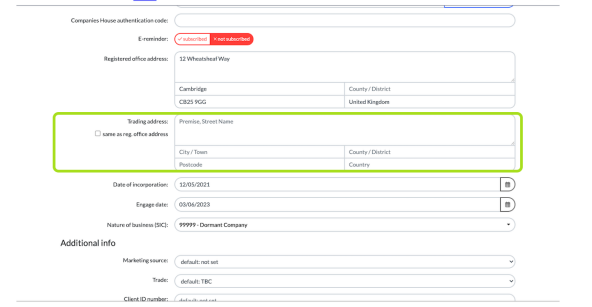
Click on next: Related individuals & contacts
Click on add
Click on next: Related individuals & contacts
Click on add
Click on use officers imported from Companies House
Select the Director
Click on Done
Click on next: Related Businesses
Click on Limited Company Accounts
Click on next: Service details
Check the dates pulled through from Companies House make match your records
Select who's going to be doing each phase of the job
Check frequency is right for each service
Click on next: until you reach External systems
This is where you can link to Qama and BOU to save duplicating info later
Click on next: Terms
Click on next: Summary
Comments
0 comments
Please sign in to leave a comment.