
Archive the client by changing their Status to archived. It is best to Archive than DELETE due to audit purposes, but if you really want to Delete a client, the steps are further down.
Archiving a client
- Locate your client in Engager, then in Client info select Step 1: General info.
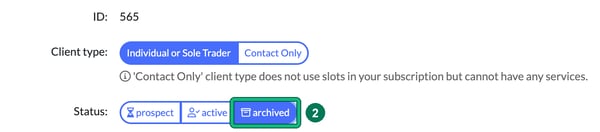
- Change the Status: from active to archived, then select Save at the bottom of the form. These will drop off of your billing the following month also.
- Once Archived, they will still be in your Engager account under Archived. Head to Clients and select the archived clients tab.
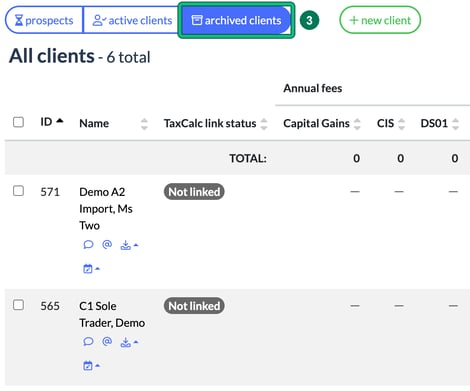
You can view their information, you can email and you can even see historic Jobs that have been completed.
You can also change a client’s status from their Summary screen: scroll to the bottom and, under Maintenance, select prospect, active or archived next to Change status:. This saves straight away, with no Save button needed. You can use it to make an archived client active again. A client’s status is also set to active automatically after they sign a Letter of Engagement.
Deleting a client
If you really want to remove the client entirely, perhaps it was a keying mistake, then follow these steps. If you have acted for this client however, we'd recommend the Archive facility above.
Important: once a client is deleted, the action is permanent and the data cannot be recovered. Please double-check before proceeding.
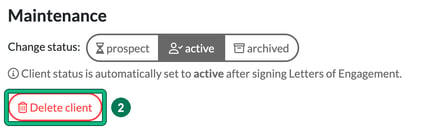
- Select Clients in the top menu and select the client or contact in question. Once selected, you'll be taken to the Summary screen (Step 10: Summary). Scroll to the bottom and look for Maintenance.
- Select Delete client.
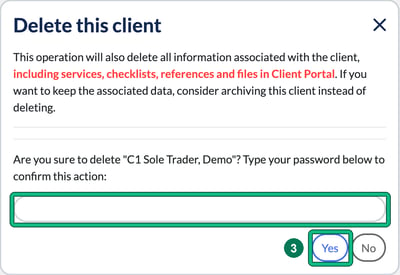
- You'll be prompted to review whether you should Delete this record entirely. The Delete this client window warns that this also deletes all information associated with the client, including services, checklists, references and files in Client Portal. If you want to keep that data, archive the client instead. To go ahead, type your password to confirm and select Yes. Select No to cancel.
If the client has contacts that are related only to them, the window also lists those contacts so you can choose which ones are deleted along with the client. Each one is ticked by default, so untick any contact you want to keep.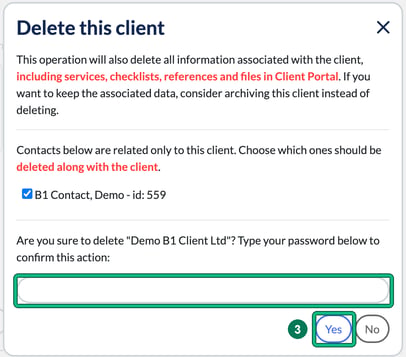
Who can delete a client
This is a good moment to check your staff’s permissions, in case they can access this option and you’d rather they couldn’t. ADMIN users have all permissions. For a user with USER access level, go to Settings > Staff > System users, select edit user, then next to Permissions: select change. In Change permissions, the Client section has a Delete client permission. Find out more in Creating and managing Users, Departments and their Permissions in Engager.
If you’re unsure whether to delete a client, contact our team at contact@engager.app before proceeding.