
We've all done it, we've all forgotten passwords so we should all be used to using the 'resets' that websites offer.
But in case you've missed it, here's how to reset yours from your practice's Engager login page.
Reset a forgotten password
- Head to your domain to log in as usual. Make sure it is the PRACTICE screen and not your client's Portal: we've seen this happen before!
- Select Forgot password?, at the bottom left of the login box beside Sign in.
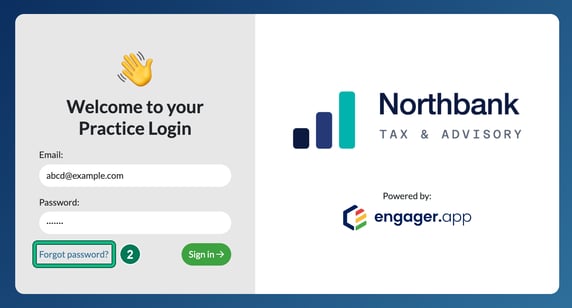
- You will then have 5 mins to locate the email and reset. Please always check JUNK AND SPAM if you're unable to find the email in your inbox.
I know my password but I want to change it
- Go to Settings > Staff > System users.
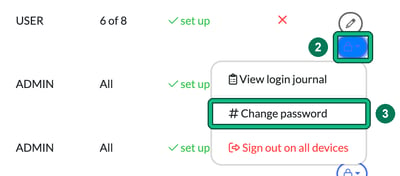
- Find your own row (or your team mate's) in the Registered users list and, in the Actions column, select the blue lock (security) button. This opens a menu with View login journal, # Change password and Sign out on all devices.
- Select # Change password. This opens Change user password, where you choose how the password is set under Password setup:
- send an email to the user with a link to set up a password (the link is valid for 3 days), or
- type new password below, then enter it in New password and Retype new password.
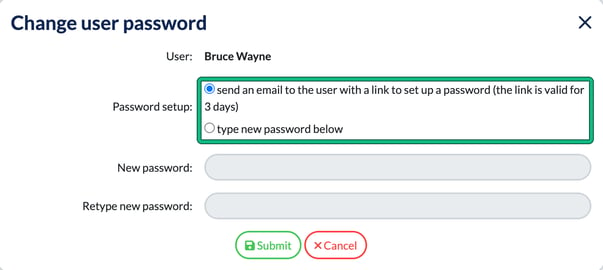
- Select Submit.
Team member has forgotten their password
The method above will resolve your team mate's log in issues also.
You can also manually reset your colleague's password for them so long as you're an ADMIN: choose type new password below in Change user password. Tell them to change it from your selected password as soon as they log in, using the method above.
Haven't invited your team member yet?
Inviting a team member couldn't be simpler. Select add new user on System users.
Enter in their basic information, paying close attention to charge out rates and permissions. See what you can change in Creating and managing Users, Departments and their Permissions in Engager.
When you select Save, this automatically invites your team mate to join Engager.