
Can I change the Client ID?
No. Engager assigns each client its own ID and you can't change it or make Engager follow your old numbering. You can still keep your existing references in Engager, as shown below.
When new customers join Engager, they often ask whether they can get Engager to sync up their existing Client Reference Numbers / IDs, and Engager to follow suit sequentially.
Unfortunately this is not possible and a lot of it comes down to audit purposes and how Engager logs the information. Engager will assign 1, 2, 3, 4 sequentially for your clients. You'll see the number as ID on the client's Client info and in the ID column of your Clients list.
Keep your existing client IDs with Match external IDs
Engager has a built-in place to store client IDs from your previous system, so you'll at least have your previous references.
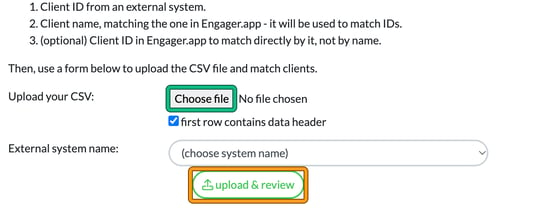
- Go to Settings and, under Client data, select Match external IDs. This opens Match client IDs from an external system.
- Prepare a CSV file with these columns:
- Client ID from an external system.
- Client name, matching the one in Engager.app. It will be used to match IDs.
- (optional) Client ID in Engager.app, to match directly by it, not by name.
- Next to Upload your CSV:, select Choose file and pick your file. Leave first row contains data header ticked if your file has a header row.
- Under External system name:, choose your previous system (Excel, Quickfile or TaxCalc code), or choose specify other: and type its name.
- Select upload & review.
Alternative: use a custom field
What you can also do is create a custom field for your existing 'Client IDs / references' so that you have these within Engager. See Using Custom Fields.