
In Engager, we've always had a Year End failsafe, whereby you can't mark a Year End job as 'complete' unless the dates have updated with Companies House.
This prevents any problems and fines that could occur if a set of accounts is missed
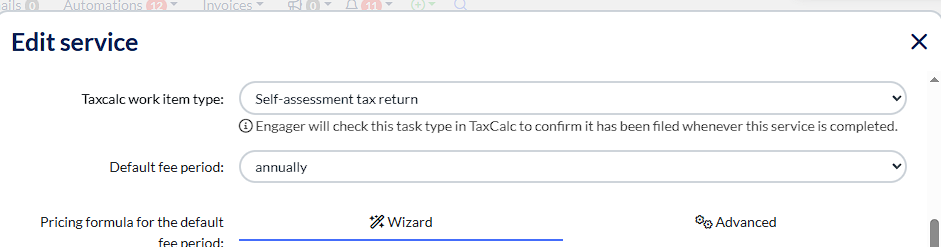
We've taken this even further now, with the integration with TaxCalc with been able to extend these safe guards. Using the TaxCalc Integration we will also be able to check if CT600s and SA100's have also been filed from TaxCalc before completing the job in Engager
If like many of clients, you combine the annual accounts job with Companies House with the CT600 filing with HMRC, you can still benefit from both our original safe guarding feature, but now with the added CT600 protection.
To enable these in your Engager account, head to Settings - Jobs - Services then locate your Year End / CT600 or SA100 job and use the pen icon to edit

Then head down to TaxCalc work item type to be presented with your options: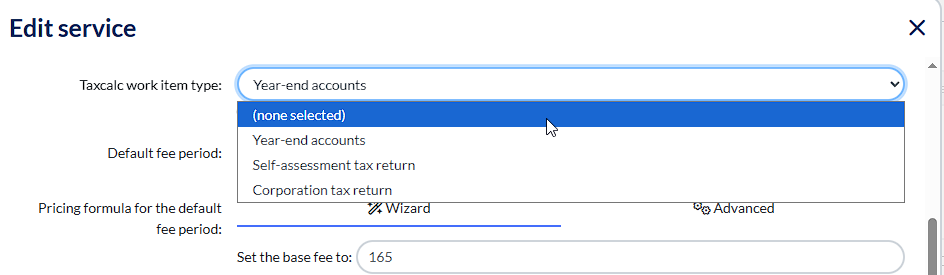
You can then select the relevant choice from there and save.
Please note - If you have combined your processes so that you file the CT600 to HMRC with the Annual Accounts to Companies House at the same time, and you've edited the original 'hard coded' service in Engager, please use 'corporation tax return' as we're already cross-referencing the dates on Companies House, so it's just the CT600 you need to check
You can now apply the same for your SA100 job in Engager.
Comments
0 comments
Please sign in to leave a comment.