
New forms start as Drafts by default, so you need to publish it before clients can use it.
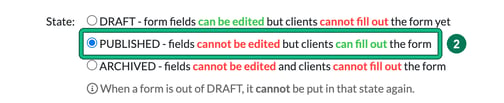
Finish your edits first. Once a form is published its fields can't be edited, and it can't go back to draft. As the product puts it: "When a form is out of DRAFT, it cannot be put in that state again."
How to fix it
- Go to Settings > Client data > Form settings and select the pencil (edit) icon in the Actions column on the form. This opens Edit form.
- Change State: from DRAFT to PUBLISHED ("fields cannot be edited but clients can fill out the form"). To check the form before you commit, select Preview.
- Select Save. The State column in the forms list shows Published.