
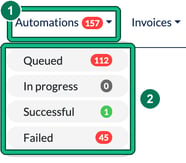
Check the Automations tab at the top of the screen and select the relevant category to see what's gone out.
- Select Automations in the top bar.
- Choose Queued for scheduled emails that haven't been sent yet, Successful for emails that have gone out, or Failed for emails that didn't send. The menu also has In progress, and each option shows a count.
Each log groups emails by automation type and shows the client, service, recipient, subject and outbox used. You can filter by Manager, Client name or Service, and select the preview (eye) button on a successful email to view it. Successful jobs are cleared from the logs after 60 days.
Automated emails only send from shared mailboxes. If emails aren't showing or sending as expected, confirm your mailbox (for example Microsoft 365) is authorised under Settings > Integrations.