
If you believe your Engager account has been compromised, it’s critical to act immediately to protect your firm, your clients, and your data.
This guide outlines the essential steps you should take.
1. Secure your account
Change your password immediately, either from your login screen or in Engager: go to Settings > Staff > System users, select the lock (security) button in the Actions column on your row, then select Change password.
If you're unable to access your account, contact us urgently at contact@engager.app so we can suspend access and assist you in regaining control.
Recommended password tips:
- Use a strong, unique password (e.g. a mix of uppercase, lowercase, numbers, and symbols).
- Avoid using the same password across multiple services.
- Consider using a password manager.
- Sign users out of every device. There’s no single button to log out all users: open the security menu on each user’s row in System users and select Sign out on all devices.
- Set up 2FA if you haven't already. On your own row, the security menu has Manage two-factor authentication. The 2FA column shows a red cross for anyone who hasn’t set it up.
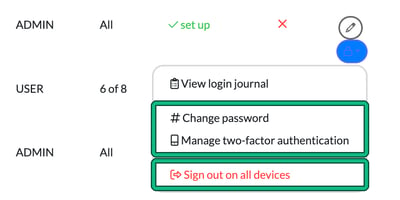
- Check recent logins. The same security menu has View login journal, which lists each login with its Timestamp, Type, IP and Failure reason, and lets you filter all, successful or failed logins.
2. Notify Engager Support
As soon as you've regained access or if you're locked out, report the incident to our team at contact@engager.app.
Please include:
- Your firm name and affected user email(s)
- Date and time you noticed the suspicious activity
- A brief summary of what happened (e.g. suspicious logins, unauthorised changes, unusual emails sent)
Our team will investigate and advise on any next steps, including a security review of your account activity.
3. Check for unauthorised access or changes
Review the following within Engager:
- Client records: Look for any new or deleted clients.
- Letters of engagement or documents: Check for any unauthorised changes or downloads.
- Emails: Review the communication history and ensure no misleading emails were sent.
- User access: Go to Settings > Staff > System users and confirm there are no unknown users added.
If you spot anything suspicious, notify our team straight away.
4. Inform affected clients (if necessary)
If it appears any client data has been accessed, you may need to inform them directly depending on your obligations under the UK GDPR and ICO guidelines.
Include:
- What happened
- What information may have been exposed
- Any actions you’ve taken (e.g. password reset, platform audit)
- What steps they may need to take (e.g. ignore suspicious emails, change passwords)
Tip: Keep your communication calm, honest, and professional.
5. Report the breach (if required)
If client personal data has been compromised, you're likely required to report this to the Information Commissioner’s Office (ICO) within 72 hours of becoming aware of the breach.
6. Review and improve your security setup
Going forward, we recommend:
- Enabling two-factor authentication (2FA) on your email accounts and any linked platforms.
- Regularly reviewing your user access list in Engager.
- Educating your team on phishing emails and suspicious activity.
Need help?
Our team is here to support you. If you're ever unsure what to do, contact contact@engager.app as soon as possible and we’ll guide you through the next steps.