
If you’re seeing the following error message while working with the Xama AML integration:
Unable to update Xama contact: CONFLICT: postcode cannot be cleared for a contact for which an AML report has previously been run.
Don’t worry, here’s why this happens and how to fix it.
What’s causing the error?
This error normally occurs when Engager is attempting to save a client or contact profile that does not have a “Registered Office” address filled in. Because the contact is linked to Xama and an AML report has already been generated, Xama requires that the address remains in place and cannot be blanked out.
When Engager tries to overwrite the address in Xama with a blank record, it triggers this conflict error.
How to fix it
- Go to Xama: log into your Xama account and navigate to the contact that’s causing the error.
- Copy the Registered Office address: copy the address that Xama holds for this contact.
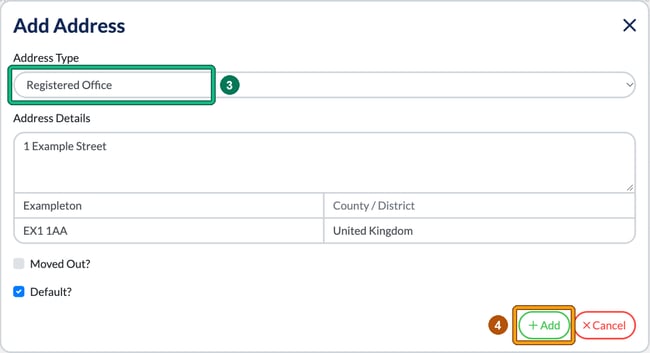
- Update the record in Engager: in Engager, find the same client or contact profile. In the client, open Client info and go to Step 2 Contact info > Addresses. Registered Office isn’t a separate field: it’s an Address Type. If the client already has a Registered Office row, edit it from the Actions column. Otherwise, select New Address, set Address Type to Registered Office and paste the address you just copied into Address Details.
- Save the record in Engager: select Add, then Save on the client form. This ensures Engager sends the correct data back to Xama, avoiding the error.
Still having issues?
If you’ve followed these steps but continue to see the error, please contact our support team at contact@engager.app. We’re here to help!
Important note: this issue isn’t caused by Engager, but rather by Xama’s requirements around preserving addresses for AML-checked clients. Keeping your records in sync between Engager and Xama will avoid these conflicts going forward.