
Uh oh, seeing a message that your Engager account is frozen? Don’t worry: it usually means there's a small hiccup with your payment, and it's quick to fix.
What’s going on?
You can pay for Engager by card, Direct Debit, Apple Pay, Google Pay or Revolut Pay. If you pay by card, common issues include:
- You’ve got a new card with a different number
- Your card has expired
- Your payment didn’t go through for another reason
We don’t process payments ourselves. We use Stripe (a trusted global payment provider). So:
🔎 Step 1: Check your inbox.
Look for any recent emails from Stripe. They’ll usually explain what’s happened and how to fix it. Often, it's as simple as updating your payment details.
Can I fix it inside Engager?
Yes! If your account was only just frozen, you’ve got 3 days to sort things out from inside the app:
👤 Select your name in the top right, then Subscription & invoices. This opens the Subscription page (you can also reach it from Settings > Application > Subscription).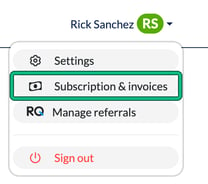
🛠️ Follow the on-screen steps to update your payment info. Your payment method is shown at the bottom of the Current subscription plan card, with an add button if no payment method is saved.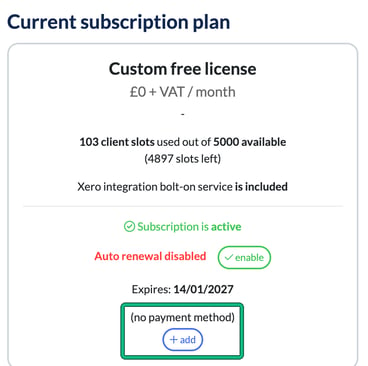
What happens if I don’t fix it in time?
We really hope it doesn’t come to this, but here’s what to expect if the issue isn’t resolved:
- After 3 days: you’ll be locked out of the app
- After 7 more days: your account and data will be archived
- After 30 days: your data will be permanently deleted
If you miss the 10-day window, reach out to us: we may still be able to help recover your data during the 30-day grace period.
Leaving Engager?
Sad to see you go, but we make it easy. You can export your full client list, along with all your files and folders, before your account closes. That way, you’ve got everything you need for a fresh start.