
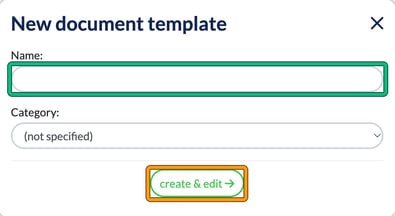
Use this text to create the template in your Engager account. Engager doesn’t include this one as a built-in template, so you create it yourself. Go to Settings > Document content > Document templates and select + new template. In New document template, enter a Name:, choose a Category: if you want one, then select create & edit. Paste the text below into the template editor and select Save (see How to add and customise document templates and Letters of Engagement). The square-bracketed fields, such as [Name] and [TaxRef:VRN], are placeholders, so they fill in automatically when the document is generated for a client. Engager has no placeholder for a partnership UTR, so type it in by hand after “Partnership UTR:”.
Professional Clearance Data Handover
Please note that if the field is blank, it means we do NOT hold this data point on record. This document forms part of the professional clearance data that you have requested, and further information will be passed on alongside this document.
Personal Details
Partnership Name: [Name]
Registered Address:
[RegisteredOfficeAddress]
Trading Address:
[TradingAddress]
Tax references
Partnership UTR:
Partnership VAT Reg: [TaxRef:VRN]
Partnership Paye Office Reference: [TaxRef:PAYEofficeRef]
Partnership PAYE Reference: [TaxRef:PAYEref]
Next Due Dates:
Partnership Tax Return Next Due: [DueDate:SA800]
VAT Next Due: [DueDate:VAT]