
With your Engager account, you can have an unlimited number of 'prospects' in your account, without these counting towards your subscription. Pretty nice of us, right?
What can you do with Prospects in your Engager account?
- Ad hoc email.
- Mass email your entire prospect list. GREAT for staying in touch, wishing Happy Christmas or asking for feedback as to why they perhaps chose not to join your service. Yes, you could potentially survey your prospects.
- Forms. Yes, you can Data Capture using forms before they've become a client of yours. The prospect needs Client Portal access to fill in a form you request.
Email your prospects
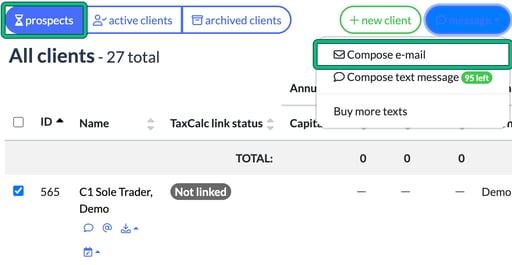
- Go to Clients and select the prospects tab.
- Tick the prospects you want to email, or tick the box in the header row to select them all.
- Select message, then Compose e-mail. You can also choose Compose text message if you have text credits.
Send a prospect a form
Open the prospect and go to Form requests, then select new request. As with clients, a prospect can only fill out a published form when you request it, and they need Client Portal access to do so.