
Select a client's name to open their record. There are two main menus: the 10 steps along the top, and the left-hand menu.
This guide will help you understand where to access your pertinent information within Engager.
- Steps 1 to 10 along the top: these are the setup menus that you may need to go into to change details.
- The left-hand menu: where you carry out actions or see details for the specific client you are looking at.
The steps along the top
The steps are Step 1: General info, Step 2: Contact info, Step 3: Related individuals & contacts, Step 4: Related businesses, Step 5: Services & pricing, Step 6: Service details, Step 7: Catch-up fees, Step 8: External systems, Step 9: Terms and Step 10: Summary.


The left-hand menu
The left-hand menu is grouped under the headings Info, Work, CRM, Documents and AML.
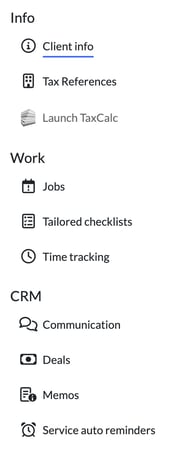
Info
- Client info: the client's summary. The record opens here.
- Tax References: here you can view and add UTRs and other references. There's a card for each tax service, a Software credentials card and a Tax data from TaxCalc panel.
- Launch TaxCalc.
Work
- Jobs: here you can see deadlines specific to this client. It opens the Jobs board for this client only, with the same adjustments and filters as the main Jobs page.
- Tailored checklists: here you can see and edit checklists for this specific client.
- Time tracking.
CRM
- Communication: the client's emails, texts and meetings.
- Deals.
- Memos: here you can add and view memos and notes on this client.
- Service auto reminders: super handy, as you may have some clients that detest getting auto reminders, so take them off the list :) Here you can add or tailor automatic email reminders for this specific client.
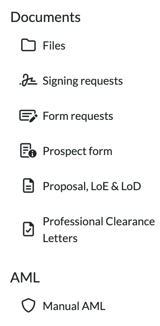
Documents
- Files: here you can view and upload files to the client record.
- Signing requests: here you can see all signing requests sent to the client and each status.
- Form requests.
- Prospect form.
- Proposal, LoE & LoD: here you see and generate proposals and letters of engagement and disengagement.
- Professional Clearance Letters: here you can view and generate professional letters of clearance.
AML
- Manual AML: a manual AML check you can adapt to your needs with custom fields.
Items that appear when an integration is linked
- Xama AML: if you have linked your Xama account, here you will see an overview of the risk assessments and client IDs stored on Xama.
- Invoices: if you're linked to a bookkeeping solution such as QuickBooks or Xero, the invoices related to this client show here.
- Payments: appears when a payment integration is linked.