
The next job only appears once you've marked the current job as complete. Engager then generates the next job for you, on the schedule set.
We often receive questions from clients who can't find the next due date of a certain job, or who are expecting to see weekly jobs in their Jobs view.
Why can't I see the next scheduled job?
Engager doesn't work like this, but we promise that the next job will always populate once you've marked the current job as complete.
This is done to keep you on track with the existing job at hand. Imagine working on next month's VAT return when you've not completed the current or previous one: it just doesn't work.
The Jobs board also has a Deadline before or equal to: filter, so a job with a later deadline may be hidden by that filter.
Don't know how to mark a job as complete?
For those of you using Kanban view:
- Click into the job card. This opens the job window.
- Select complete job, top right of the job window.
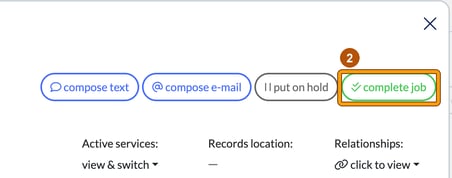
For those using list view (switch to list), it's the green tick button in the Put on hold / Complete column on the right-hand side. Its tooltip reads "move to the next due date".

If the job has a checklist
For both views, if you have a checklist against the job, you need to complete it before you can complete the job, or you can override it. Otherwise complete job shows "Checklist needs to be completed before completing the job."
To override:
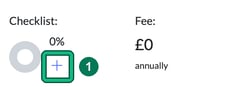
- In the job window, select + under Checklist:. This opens the Service checklist. If the checklist already has saved answers, select edit on it instead.
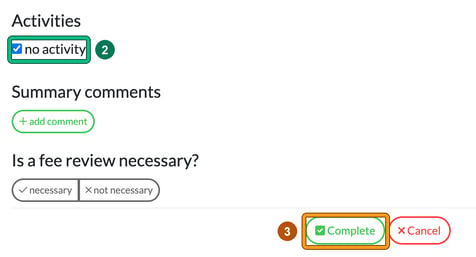
- Under Activities, tick no activity.
- Select Complete.
You can then mark the job as complete with complete job.