
Yes. The system is designed to allow a single director to act for multiple companies, or be associated with multiple companies.
All you need to do is link them together, by opening the Ltd required and adding the director in Step 3: Related individuals & contacts. All related individuals have access to that business's Client Portal.
Link a director to a company
- Open the company from Clients.
- Select Step 3: Related individuals & contacts in the steps along the top.
- Select + add, on the right of Currently related individuals. This opens Add related individual.
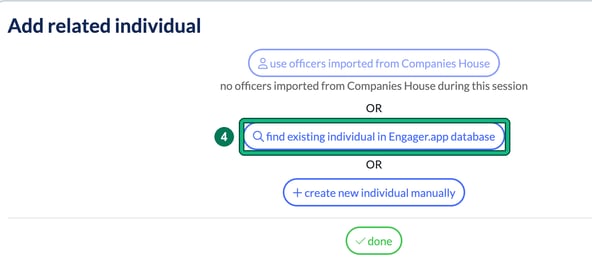
- If the director is already in Engager, select find existing individual in Engager.app database.
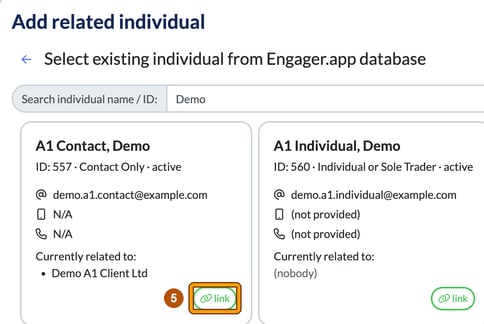
- Type their name or ID in Search individual name / ID:. Each match shows who they are Currently related to:. Select link on the right person.
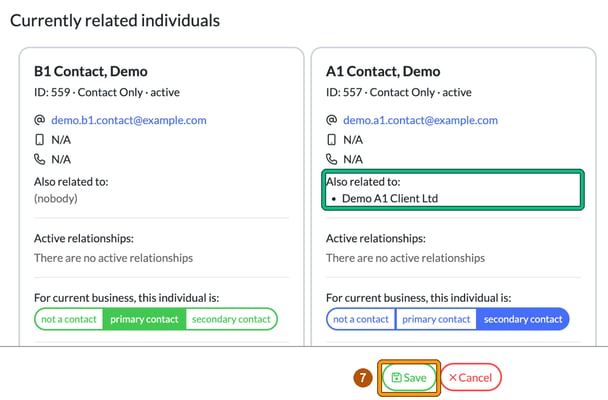
- Select done. The director now appears under Currently related individuals, with their other companies listed under Also related to:.
- Select Save at the bottom of the step. If you select Cancel, the link isn't kept.
Your director should now show in the Related clients column in your overview of Clients.