Yes. Choose who is notified when a client uploads a file to the Client Portal in Settings > Notifications.
Notifications are in the bell at the top of the screen. They don't email you; they just appear in the bell at the top of the screen.
Spend a little extra time reviewing all notification settings to make sure you're working efficiently and taking action when needed.
Choose who is notified
From here you'll have control over who gets informed about what, so take your time adding your staff to the most important notifications. As an example, I would want ALL staff to know if a client has sent through some documentation.
- Select Settings (the cog in the top bar), then Notifications, under the Jobs heading.
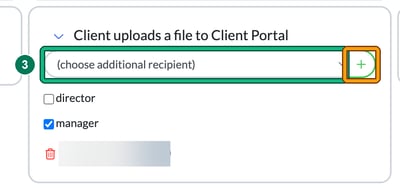
- Under Recipients to include, select the card Client uploads a file to Client Portal to expand it.
- Choose your staff member from the (choose additional recipient) dropdown, then select the green + button to add them. Repeat for each person. To remove someone, select the red bin icon next to their name. The card also has director and manager tick boxes. (creator isn't an option for this notification.)
- Select Save at the bottom of the page.
There's no email option on the Notifications page, so these alerts only appear in the bell of the people you've chosen. If you're not on the card, you won't see one.
What happens when your client uploads a file
In the Client Portal, your client's Files shows only the folders you've shared with them, each labelled Read & upload or Read-only. In a Read & upload folder they select UPLOAD FILE, drag and drop or select their files (max. size: 50 MB), and can RENAME a file or ADD NOTE before selecting UPLOAD.
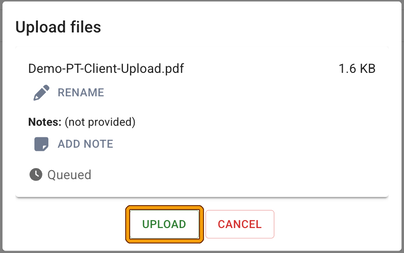
The file lands in the same folder on the client's record in Engager, with Created by showing Client and the upload time. The recipients on the Client uploads a file to Client Portal card get a notification in their bell; anyone not on the card doesn't.

I've lost track of my notifications: I'm worried about missing something
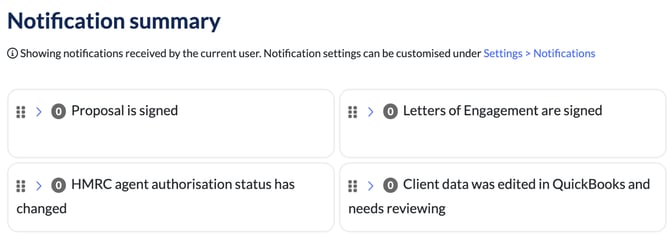
We've got you covered. We've built you a handy summary page for all notifications, grouped by notification type, from LoEs signed and documents sent to a task being assigned to you to complete.
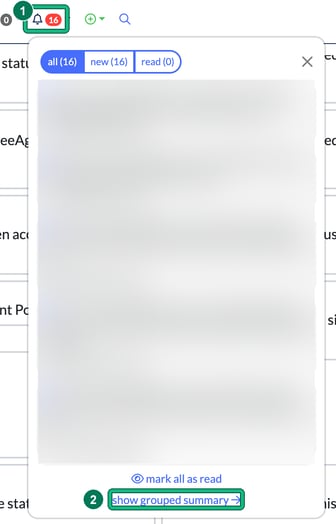
- Select your notification bell icon. The panel lists your notifications under all, new and read, with mark all as read at the bottom.
- Towards the bottom, select show grouped summary.
And voilà, here's your summary! The Notification summary page shows the notifications received by you, the current user, with one card per notification type and a count on each.