
We have a great feature of Internal Deadlines for you to work towards an in-house goal. Do you want to get accounts finalised 6 months before the statutory deadline? Of course!
So in the system, you can set this on your services as a default for ALL Jobs, or at a client level when you create the client.
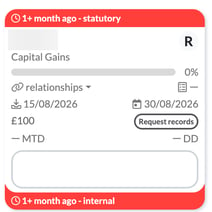
Once created, your Job Cards will have a new appearance as they will now have the statutory deadline at the top of the card, and Internal at the bottom. On the Jobs page, Adjustments also has an ignore internal deadlines option (and the Dashboard has ignore internal deadlines for job widgets), so you choose whether your jobs are shown against their internal deadlines, to get these done way in advance and really impress your client.
Set an internal deadline for a service
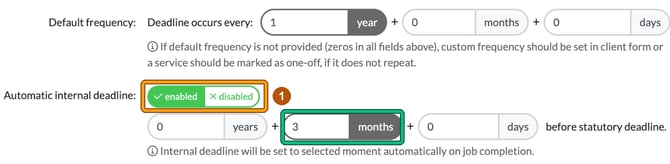
- Head to Settings > Jobs > Services and select the pencil icon in the Actions column for the service. This opens Edit service. Scroll down to Default frequency: and set Automatic internal deadline: to enabled.
- Remember, we're working backwards from the statutory deadline, so if you want the internal deadline to be 3 months before the deadline, enter 3 in months before statutory deadline. The hint underneath reads “Internal deadline will be set to selected moment automatically on job completion.”
Switch it on for the client
You will need to SWITCH ON the Internal Deadline for the client. So, when enabling your services, make sure you apply the Internal Deadline to that service moving forwards.
- In the client form, go to Step 6: Service details. Each service has an Auto internal deadline choice: default from service definition, custom or disabled. If the service has it switched off, you'll see “(disabled by default)”. Choose custom to set the client's own timing in Internal deadline happens: years, months and days before due date.

- Under Dates, next to Internal deadline:, select the symbol that has an arrow signalling LEFT (its tooltip reads “set from auto internal deadline rule”). It fills in the internal deadline from the rule, for example 30/09/2026 for a next due date of 31/12/2026 with 3 months.
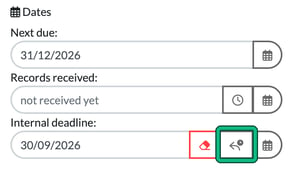
Please note that without selecting this button, the new internal deadline isn't applied to the current job, so you must select the button. After that, the rule sets the internal deadline automatically on job completion.
Now we've set this Internal deadline, our Job Card has 2 deadlines: the statutory deadline in the bar at the top and the internal deadline in the bar at the bottom.
Switch on internal deadlines in bulk
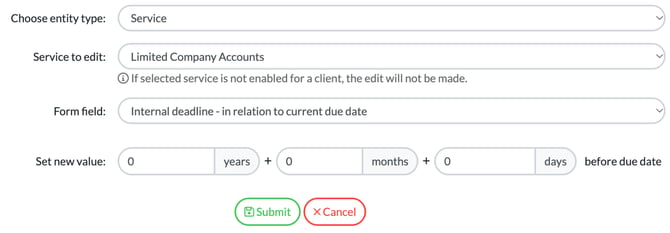
Internal Deadlines can be switched on in Bulk Actions also! So if you've missed any, simply select all your clients in the Clients list, then select bulk actions > Edit client or service data. In Bulk editing, set Choose entity type: to Service, pick the relevant service in Service to edit:, then choose a Form field:, either Internal deadline - in relation to current due date (set years, months and days before due date) or Internal deadline - exact date. If the selected service is not enabled for a client, the edit will not be made.
Very handy!