Different software systems store addresses in different formats. For example, some may use two lines for the street, separate fields for town and postcode, or apply different country formats (e.g. “UK”, “United Kingdom”, “Great Britain”).
When Engager compares an address with the version held on Companies House, even small differences in formatting can trigger a discrepancy alert.
In many cases, users accept these updates so that Engager matches Companies House. However, this can create a knock-on effect with other integrated systems (such as QBO, Xero, FreeAgent, AD Fin, or TaxCalc), potentially resulting in a recurring cycle of mismatched data.
To help prevent this, we’ve introduced the option to ignore address updates from Companies House. This allows you to keep your Engager address unchanged and maintain consistency with your other connected systems, avoiding ongoing mismatch loops.
How to ignore the update from Companies House
- When you receive the notification bell, with the message 'Updates to clients data have been received from Companies House and await confirmation', it takes you to the Companies House updates page. You can also go there at any time from Settings > Client data > Companies House updates.
- The page is called Choose what information to keep in Engager.app. Under Sync choices, we'll display the Client and the relevant fields. It will be clear to see where there's a mismatch, as you'll see a button to select for either Engager.app: or Companies House:. The Companies House option is selected by default.
- Select the set of data you wish to use, then the green tick in the Action column to confirm your choice.
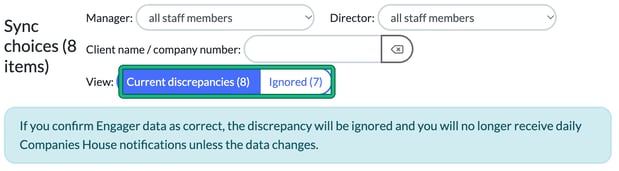
If you keep the Engager.app data, the discrepancy moves to Ignored. As the page says: "If you confirm Engager data as correct, the discrepancy will be ignored and you will no longer receive daily Companies House notifications unless the data changes."
Use the View: toggle to switch between Current discrepancies and Ignored.