
For a company client, the AML tab shows information from Companies House, including an ownership chart. This helps you see who runs and owns the business when you assess its anti-money laundering (AML) risk.
Open the ownership chart
- Open the company client.
- Select AML in the left-hand menu.
You'll see the Companies House Information card and, below it, the ownership chart.
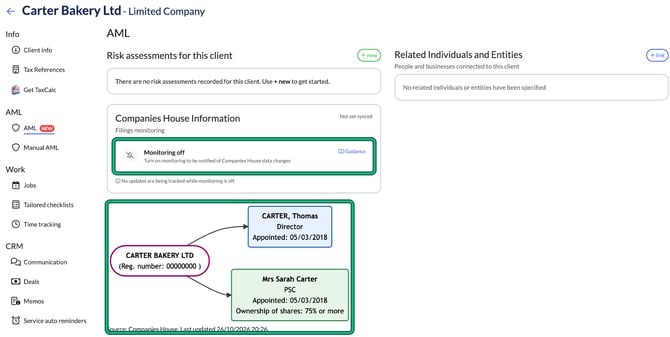
Read the ownership chart
The chart links the company to its directors, secretaries and persons with significant control (PSCs). Each box shows the person's role and appointment date. For PSCs, it also shows their ownership band, for example "Ownership of shares: 75% or more".
Under the chart you'll see the source, Companies House, and when the data was last updated.
If Engager can't get the data from Companies House, you'll see a "Graph unavailable" message. This doesn't mean there's a problem with the company.
Filings monitoring
The Companies House Information card also shows Filings monitoring. You don't need to switch it on. It shows as active once the company is synced with Companies House through Engager's Companies House integration. Until then, the card shows Not yet synced and Monitoring off.
For more about how Engager checks Companies House for changes, select Guidance on the card or read Companies House updates.