
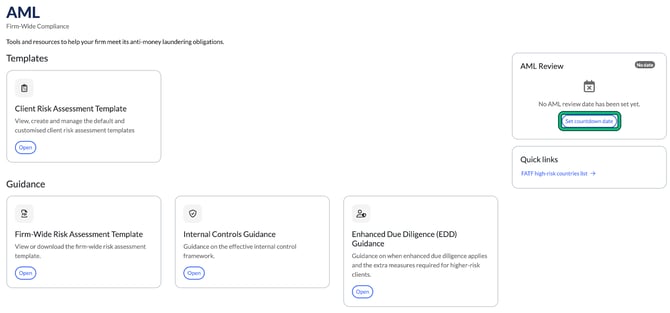
The firm-wide AML area holds the anti-money laundering (AML) guidance and templates for your whole firm, and a countdown to your next firm-wide AML review. To open it, select AML in the top menu.
Read or download the guidance
- Under Guidance or AML Training, select Open on a document.
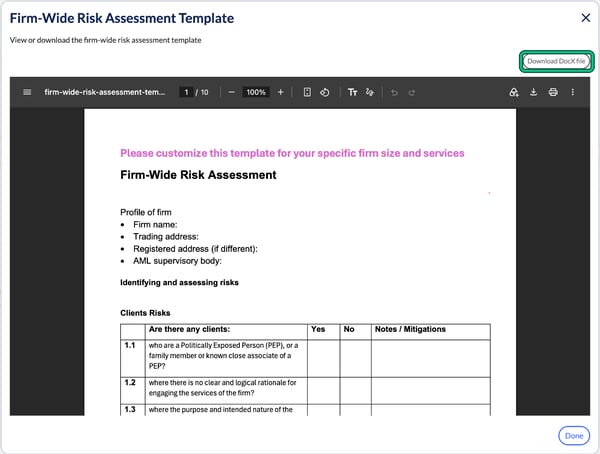
- Read it in the window that opens.
- Close the window when you've finished.
The documents are:
- Firm-Wide Risk Assessment Template: a template to adapt to your firm's size and services. Select Download DocX file to edit it in Word.
- Internal Controls Guidance: what an effective internal control framework looks like.
- Enhanced Due Diligence (EDD) Guidance: when EDD applies and the extra measures for higher-risk clients.
- Staff and Agents Training Guidance: what to cover in AML training and how to keep records.
The guidance is general information. It isn't legal advice and doesn't replace guidance from your supervisory body.
Set your AML review countdown
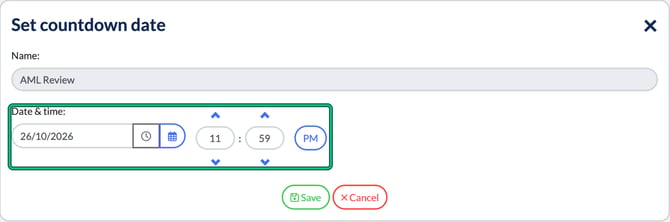
- On the AML Review card, select Set countdown date.
- Choose the Date & time of your next firm-wide AML review.
- Select Save.
The AML Review card now counts down to that date.
Check the FATF high-risk countries list
Under Quick links, select FATF high-risk countries list. It opens the Financial Action Task Force (FATF) website in a new tab.
Client risk assessment templates
Under Templates, select Open on Client Risk Assessment Template. See How to set up client risk assessment templates.