
An AML ID check verifies an individual client's identity electronically against Equifax's records. You answer a few questions about how you've identified the client, confirm their details and address, and then run the check.
Engager helps your firm meet its anti-money laundering obligations and keep a record of what you did. Your firm remains responsible for its own AML decisions. For advice on what your firm must do, speak to your supervisory body or read the guidance documents in the firm-wide AML area.
Start an AML ID check
- Open the individual client and select AML in the left-hand menu.
- Under Electronic Verification, select + new next to AML ID Checks.
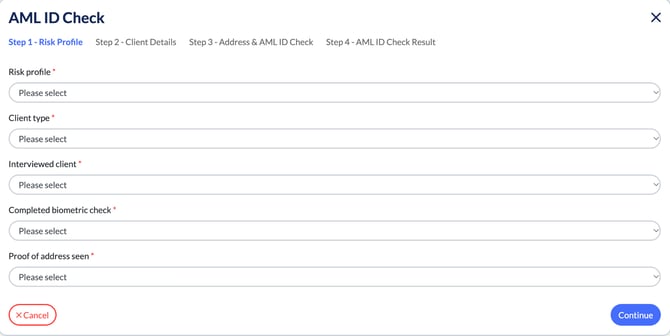
The AML ID Check opens at Step 1 - Risk Profile.
Step 1: Risk Profile
Answer each question, then select Continue:
- Risk profile: Normal risk or High risk.
- Client type: An existing client, A new client known to you or your staff or A wholly new client.
- Interviewed client: whether you interviewed them at home, face to face elsewhere and saw photo identity, by video call and saw photographic ID, or not at all.
- Completed biometric check: whether they've completed a biometric ID check, with or without proof of address, or not.
- Proof of address seen: a utility bill, bank statement or council tax bill dated within 3 months; HMRC correspondence or a mortgage statement dated within 12 months; or none.
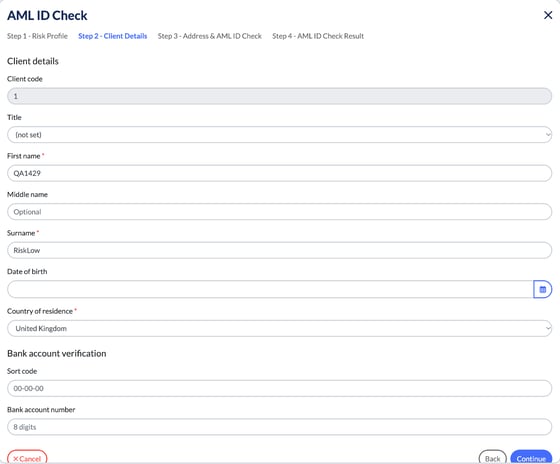
Step 2: Client Details
Check the client's name, then fill in their Date of birth and Country of residence. You can also enter a Sort code and Bank account number under Bank account verification. Select Continue.
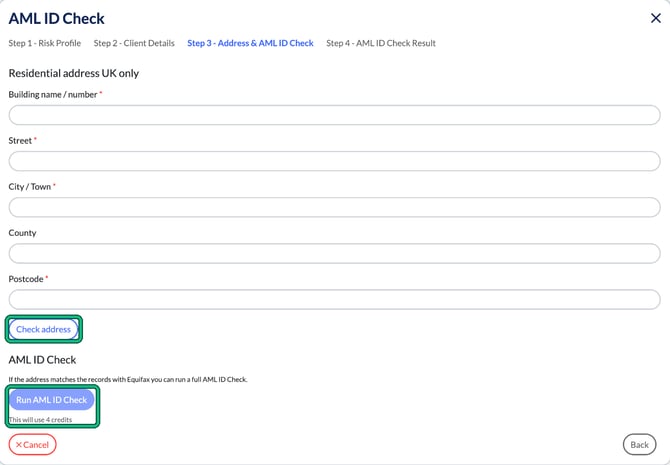
Step 3: Address & AML ID Check
- Enter the client's UK residential address.
- Select Check address.
- If the address matches Equifax's records, select Run AML ID Check.
An AML ID check uses 4 credits. Engager shows this under the Run AML ID Check button.
Step 4: AML ID Check Result
The result of the check is shown in Step 4 - AML ID Check Result and saved under AML ID Checks on the client's AML tab.
If you need a higher level of assurance, you can also send a biometric ID check.