AML ID checks use data from Equifax. Before you can run them, Equifax needs to approve your firm's AML registration. Both AML ID checks and biometric checks use credits.
Complete your AML registration
- Select Profile at the bottom of the left-hand menu, then Settings.
- Under AML, select AML Registration.
- Select Buy registration. The registration package includes 150 credits to get you started.
- Fill in the registration form, including your Data Protection Registration Number, your business details, the owner or director's details and Who is your AML Regulator?.
- Select Submit registration.
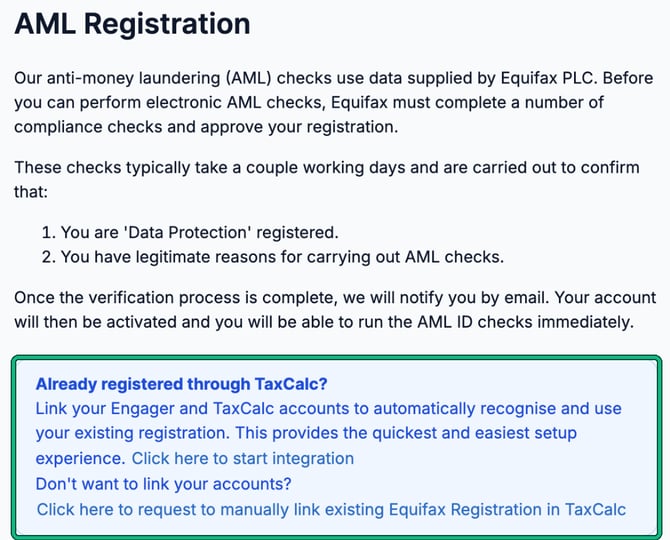
Equifax checks that you're registered for data protection and have a legitimate reason for carrying out AML checks. This usually takes a couple of working days. Engager emails you once your registration is approved, and you can then run AML ID checks.
If you're already registered through TaxCalc
Your AML registration can be shared between Engager and TaxCalc, so you don't need to buy it again. On the AML Registration page, under Already registered through TaxCalc?:
- select Click here to start integration to link your Engager and TaxCalc accounts, which is the quickest way; or
- select Click here to request to manually link existing Equifax Registration in TaxCalc if you'd rather not link your accounts.
AML credits are bought separately for Engager and TaxCalc and can't be shared between them.
Buy AML credits
- Go to Settings and, under AML, select Buy AML Credits.
- Under Choose an amount, enter the Number of credits. Larger amounts cost less per credit.
- Check the Summary, then select the Buy button.
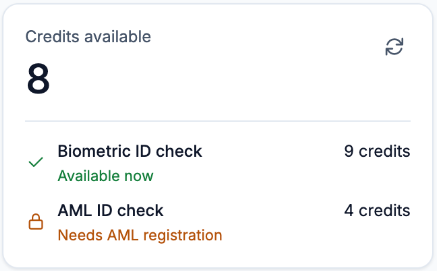
Credits are pay as you go, with no subscription, and are valid for 12 months from purchase. The page shows your Credits available and how many credits each check uses:
- AML ID check: 4 credits. AML ID checks also need your AML registration.
- Biometric ID check: 9 credits. Biometric checks work with a plain credit top-up.
What happens if you haven't registered or have run out of credits
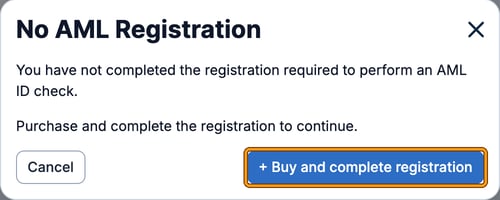
If you start an AML ID check before your registration is complete, Engager shows No AML Registration. Select Buy and complete registration to go to the registration page.
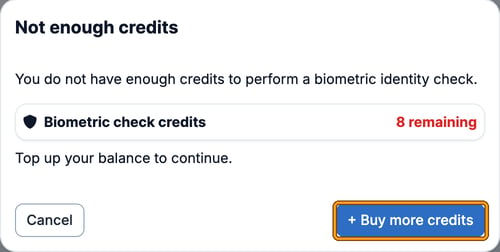
If you don't have enough credits for a check, Engager shows Not enough credits with your balance. Select Buy more credits to top up.