
A manual ID check records the identity documents you've seen for a client and whether you met them. Use it alongside, or instead of, an electronic check.
Record a manual ID check
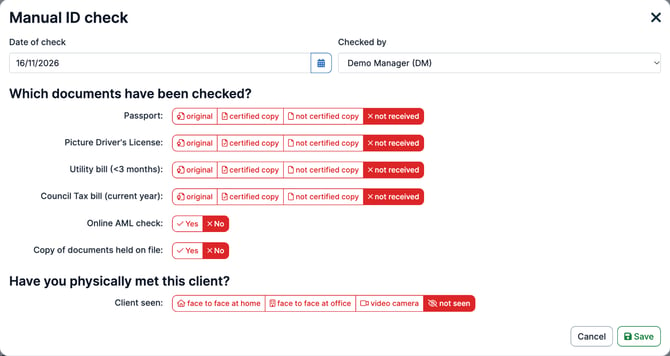
- Open the client and select AML in the client's menu.
- Under ID verification, select + new next to Manual ID checks.
- Check the Date of check and choose who Checked by.
- Under Which documents have been checked?, choose original, certified copy, not certified copy or not received for each document: Passport, Picture Driver's License, Utility bill (<3 months) and Council Tax bill (current year).
- Choose Yes or No for Online AML check and Copy of documents held on file.
- Under Have you physically met this client?, choose how the client was seen: face to face at home, face to face at office, video camera or not seen.
- Select Save.
The check appears under Manual ID checks with the date, the documents seen, whether the client was seen and who checked. To change it, select View / edit.