
Go to the client's Step 10: Summary, delete their Portal account, then re-invite them.
This resets their login without affecting the client's existing records or history. The product says so under the button: "Deleting a Portal account does not affect client data."
Where to find the portal controls
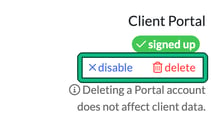
On the client's Summary, the Client Portal box on the right shows signed up with two links: disable and delete.
Reset their login
- Select delete. Engager asks you to confirm before it deletes the Portal account, then shows "Portal account for this client has been deleted".
- Invite the client again. They sign up with a new invite, as they did the first time.
Disable isn't a reset
disable switches the client's portal access off straight away, without asking you to confirm, and shows "Portal for this client is now disabled". The link then becomes enable, which switches the same account back on. Their login is kept, so disabling doesn't reset it. Use disable when you want to pause someone's access, and delete when they need a fresh login.
If the client is a company
A Limited Company has no Client Portal box of its own. Portal access belongs to each related individual: on the company's record, each person under Related individuals & contacts has their own Portal line, so reset access for the person concerned.
Read more: How do I invite my client to their portal, reminding clients of their login details