
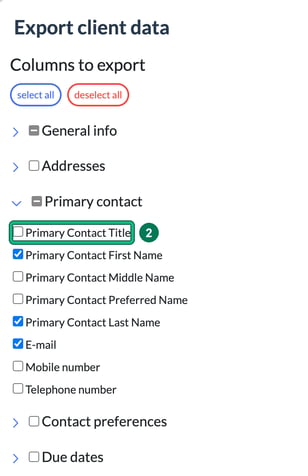
You can choose which fields to include when you export: just tick them at export time. To leave titles out of an export, leave the Primary Contact Title column unticked. You don't need to remove titles from your client records.
Export only the fields you need
- Go to Clients, select data, then export. This opens Export client data.
- Under Columns to export, expand each group and tick the columns you want. To exclude titles, open Primary contact and leave Primary Contact Title unticked.
- If you export the same columns regularly, save them as a preset: under Presets, enter a name and select save.
- Select export.
See which clients still need their Self Assessment done
Go to Jobs and open the Filters panel. Set Job types: to SA100 and Deadline before or equal to: to this year's deadline. The list shows the Self Assessment jobs still outstanding.