
To undo a job that you have already completed, set the service's dates back to the old ones. The audit trail shows you what they were.
Undo a completed job
- Head on over to the client in question, go to Summary (Step 10) and find the relevant service.
- Make sure you select the arrow to expand the service, then scroll down and select Audit trail.
- You'll then see a full audit log of comments etc. When a job is completed, the newest entry shows the dates it moved from and to, for example Next due: 28/10/2026 to 25/11/2026 and Internal deadline: 25/10/2026 to 22/11/2026.
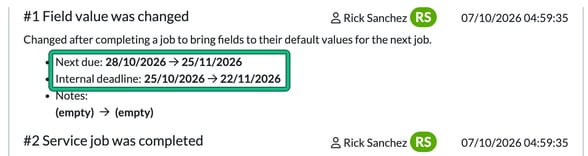
- To undo it, go to Service details (Step 6) and set the old date in Next due: to move it back to the deadline date you need it to sit on. Set Internal deadline: back too, then select Save.
Moving the dates back restores the deadline only. The job's phase progress restarts from the first phase.
Phase / Steps
If you want to reverse a completed Phase / Step, simply enter the job card and, under Phases, select previous (next to complete current).
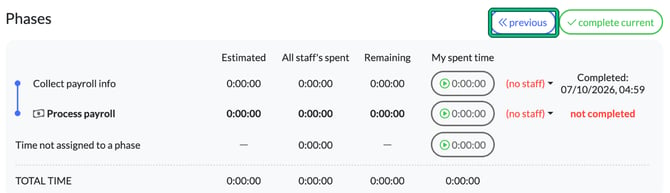
You've now reversed that phase / step.