
Some of you may have seen us have a Birthday Service within the Engager account, either on a demo or webinar.
It's a lovely touch to wish your clients a happy birthday and if it's something you'd like to do, read on!
Bday message template
- Go to Settings > Communication > Message templates and select new template.
- Create your Bday message.
- Select Save.
Create a custom service
- Go to Settings > Jobs > Services and select add custom service. This opens New service.
- Label it Bday in Full name: and Short name:, and make sure you set Internal only: to yes. Services marked as Internal only aren't included in LoE or fee tables sent to a client.
- Under Default frequency:, set Deadline occurs every: to 1 year.
- Select Save.
Then set up global auto reminders on the service
- In the Services list, find your Bday service and select set up in the Global auto reminders column. In Auto reminders for your service, select + new to open Create auto reminder.
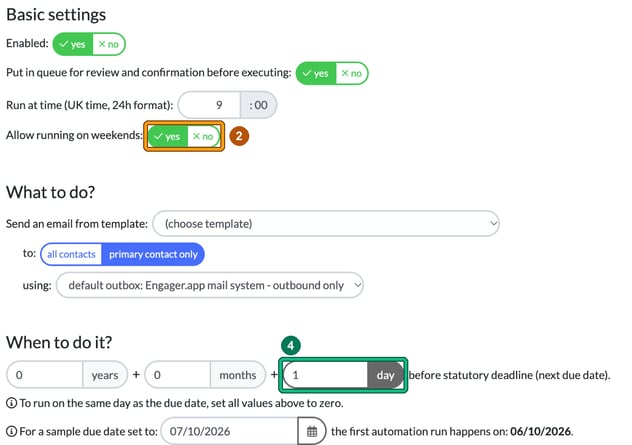
- Under Basic settings, set Allow running on weekends: to yes. Don't want to miss it!
- Under What to do?, select your Bday template in Send an email from template:.
- Under When to do it?, set how many years, months and days before the next due date the reminder runs. As the form says, to run on the same day as the due date, set all values to zero, so 0 days sends it on the birthday itself.
- Select Save.
To enable on client
- Locate the client and open their record.
- Go to Step 5: Services & pricing.
- Enable your new Bday service.
- Go to Step 6: Service details.
- On the Bday service card, under Dates, enter the client's birthday in Next due:.
- Select Save.
You can then mark the job card as COMPLETE and it'll regenerate for the next year.
Because they're automated reminders, they will land in your queue so you can tailor them before they leave, so you can add that extra personal touch (if you like 'em). This happens while Put in queue for review and confirmation before executing: is set to yes, which is the default.