
We get it, there are times when your 'to do' list becomes a little unruly, and you can't see the woods for the trees.
We've had questions to us about how tasks can be separated when they all share the same DEFAULT Status of Request records, making it challenging to see the most important.
Eventually, it just looks like one long list of items to plough through. How do you know which ones MUST be done?
Solution: High Priority
If you have a vital task that must be done, change the priority accordingly, meaning it will stand out from the pack.
- When creating a new task (+ create task on the Jobs board opens Create single or multiple tasks), you can set the priority there: choose High priority from Priority:, then select Save.
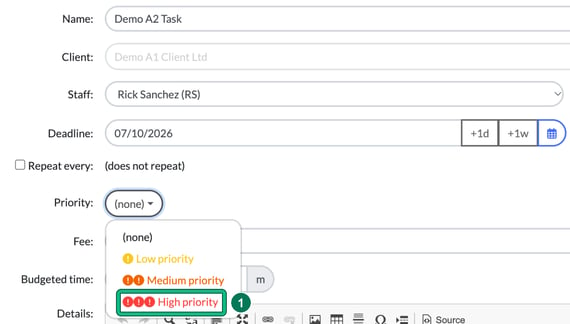
The task's card then shows its priority icons in the header.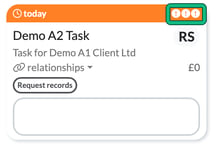
- You can also edit existing tasks to change their priority. Locate the task and select its card to open it, then change Priority: straight from the drop-down at the top left, or select edit task to change it in the full form.

This way, you're adding separation to your task list, which should make your lives a little easier when your to do list becomes a bit too much.
Change the priority icon
Did you know that you can change the ICON for priority also?
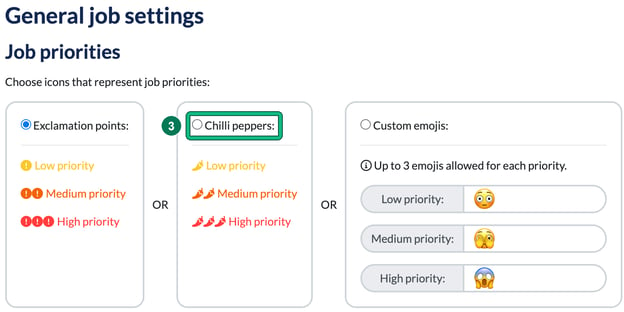
- Go to Settings and, under Jobs, select General settings. Under Job priorities, you can switch from Exclamation points: to Chilli peppers:, which makes them stand out a little more visually. Or choose Custom emojis: and pick your own, up to 3 emojis for each priority.
Thanks for reading!