
If you panic wondering why your newly created service isn’t appearing on your Dashboard, it’s because it hasn’t been added to a service group. Only services in a service group show on your Dashboard widgets.
Service groups are a great way to keep your account neat and tidy and also generate those all important widgets on your Dashboard. Each service group also gets its own shortcut button under Jobs in the top navigation bar.
Create a service group
A great example of when to ‘group’ services would be something like ‘bookkeeping’, so let’s set up our service group.
- Go to Settings > Jobs > Service groups.
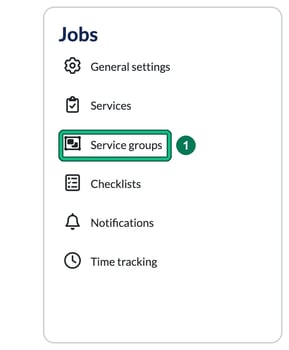
- On the Service groups page, select + add group at the top right. This opens Add service group.

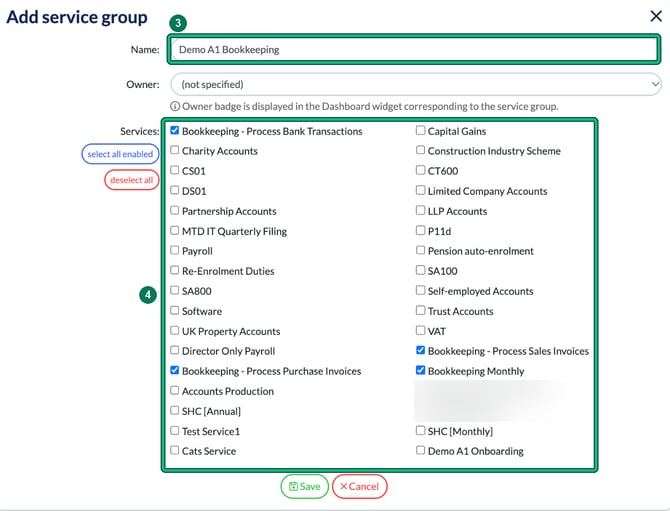
- Give it a title in Name. Remember this will appear on your widget on your Dashboard. You can also choose an Owner, whose badge is displayed in the group’s Dashboard widget.
- Under Services, tick every service you want to sit under this heading and widget. To tick them all at once, use select all enabled. Then select Save.
Your new widget
This is how my widget for Bookkeeping appears on My dashboard. It shows a red count of overdue items, plus counts for the next 7 days.
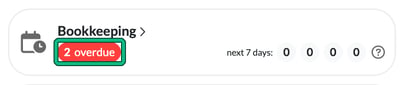
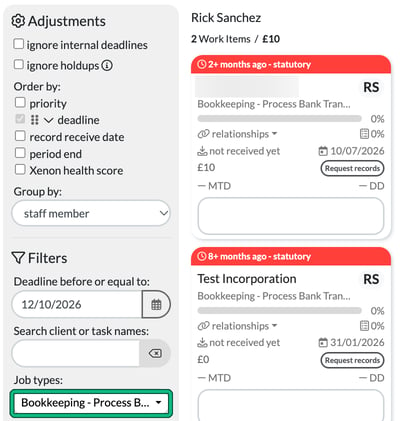
The widget is steering me to investigate what’s going on. Select the red overdue count and Jobs opens, filtered under Job types to the services in the group, so you see the overdue items across ALL of them. If your group holds different types of bookkeeping service, such as bookkeeping for VAT and bookkeeping for Month End, they are all pulled through together.
In the example below, the group holds one service, so the two overdue Bookkeeping - Process Bank Transactions jobs are shown.
Grouping your services together like this can really make your Dashboard and the widgets within highlight anything that needs attention, and helps you run your practice more effectively.