
Engager has a proposal document. On a client, go to Documents > Proposal, LoE & LoD and create a document. Create new from template offers Proposal with separate Letters of Engagement. The client needs a primary contact before you can generate documents. You can change how the proposal looks in Settings > Document design > Proposal.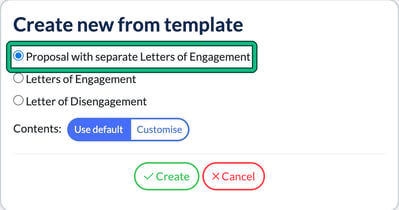
Currently, it may look as though it's the Proposal and LOE, which it is and works for 90% of our clients, but we get it, you may want something less formal while you're feeling out your client and potentially willing to negotiate terms and pricing.
So you need something that's perhaps a little less rigid, a little less 'final'? Then read on!
Create a Proposal
What you can do however, is create a NEW proposal only email template.
- Go to Settings > Communication > Message templates and select new template.
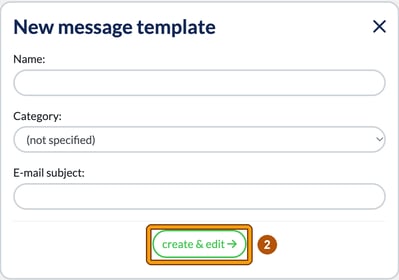
- In New message template, enter a Name: and E-mail subject:, then select create & edit.
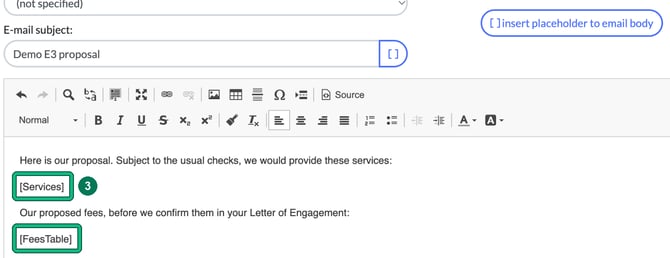
- Just add the following passages in so it picks up the services and pricing, then tailor the tone / content to be more of a proposal: so lighter, less heavy in tone and perhaps 'subject to receiving acceptable responses from previous account / due diligence etc'. Remember, you want to pull through the services and fees etc, so you'll need to INSERT PLACEHOLDERS with insert placeholder to email body, or type them in. In this example, [Services] lists the services and [FeesTable] shows the fees.
- Select Save.
This way, you can have a tailored email proposal, with the services and pricing outlined and your terms of what you need to then turn this into an LOE and the client fully engaged.
This is a workaround but it works just fine.