
Companies House SIC Code Update
You can add up to 4 Companies House SIC codes to each of your LTD clients. This is limited to 4 as this is the Companies House limit.
As you may already be aware, we have a wonderfully helpful link with Companies House, via something called an API connection. This will cross reference your client’s data in Engager against the Companies House database.
If there are any differences, it will suggest you update these the following day. We will not override your account automatically.
When you check your Engager account in the morning, review your Notifications every morning as best practice.
Once you select ‘updates to client data’, it will take you to a list of items that need attention. You can also open this list at any time from Settings > Client data > Companies House updates.
***Please note***
We will never update your data automatically. We would never override your details without consent, hence this feature.
Within the list, you can see the client and the area that has been identified as having a change or discrepancy (for example SIC Codes). For each one, Engager shows its own value next to the Companies House value, and all you’ll need to do is review and then accept the recommended change. If you confirm the Engager data as correct instead, the discrepancy is ignored and you won’t receive daily Companies House notifications about it unless the data changes.
SIC Code Improvements
From 08th September, we will now have the ability to pull through and store any missing SIC Codes for all LTD records.
So if you see lots of Notifications all about Companies House, don’t panic, it’s just the Engager platform recognising that there’s more data to sync into your account.
Please go ahead, check the recommended changes and approve and you’ll be fine.
Manually Update SIC Codes
There will be times when you’ll wish to add SIC Codes manually, so in order to do this, head over to the LTD record.
- Locate the LTD in question.
- Select Step 1: General info.
- Head down to Nature of business (SIC codes):.
- Click the dropdown to expose the complete list of codes available. To find a code quickly, type it (for example 62012) in the search values box.
- Select your desired SIC Code from the list.
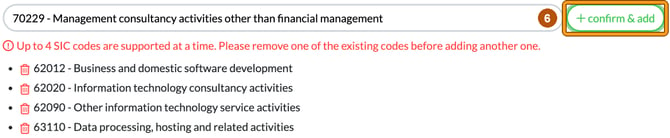
- Select confirm & add. The code appears in a list below the field, with a red bin icon if you need to remove it. You can add up to 4 SIC Codes, in line with Companies House. If you try to add a fifth, Engager tells you to remove one of the existing codes first.
- Select Save.
If you have the ‘nature of business’ enabled on your Client Columns view, you’ll see the additions in your Clients list.
SIC Codes FAQs
Way ahead of you here, YES, the new changes will impact your Forms in Engager.
Yes, you can add these to your Client Import also. The import form includes a Nature of Business (SIC codes) column for Limited Companies (Settings > Client data > Import clients).