If your client gets in touch to say that they can't find a document to review, then the first thing you'll need to check is your Folder Templates settings.
How to check and fix it
- Head to Settings > Portal > Folder templates.
- Choose the Client type: for your client, for example Limited Company. Folder templates are set per client type, so nothing shows until you choose one.
- From here, review the folders paying close attention to READ, which appears in green with a tick when it's enabled and grey with a cross when it isn't. So, locate the area in question and ensure that READ has been enabled, which means your client can then see the document in question.
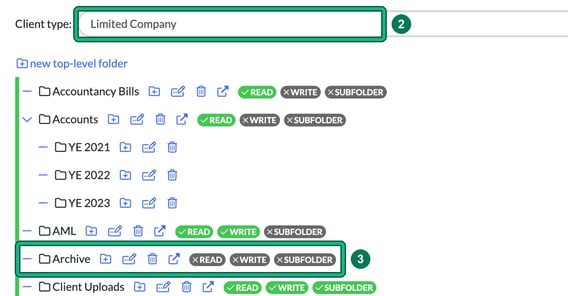
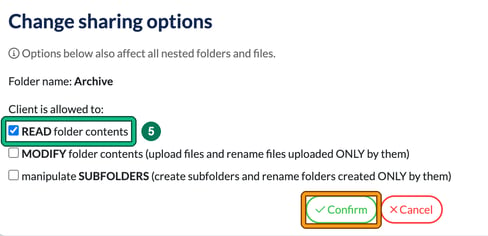
- If it hasn't been switched on, select the change sharing options icon for that folder (the arrow out of a box, after the bin icon). This opens Change sharing options.
- Tick READ folder contents, then select Confirm. These options also affect all nested folders and files.