
You’re always in control of your Engager subscription. Whether you need to upgrade, downgrade, or add a bolt-on, the process is quick and straightforward inside your account settings.
In your Engager account, you have complete control over your subscription. Whether you're ready to move from a Trial Account, selecting a higher plan ready for an influx of customers, or if you're looking to leave, you can do this all from your own Settings.
How to change your subscription
- Log in to your Engager account.
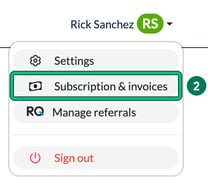
- Select your name in the top right, then Subscription & invoices. This opens the Subscription page (you can also reach it from Settings > Application > Subscription).
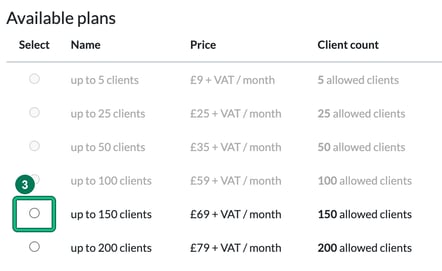
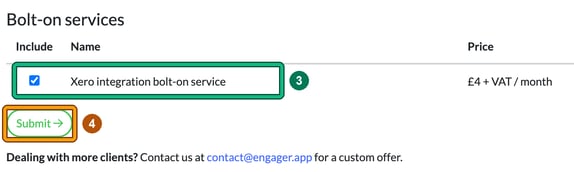
- Under Change subscription, choose your plan (upgrade, downgrade, or add a bolt-on). You'll have options to upgrade your account or change from your Trial by selecting the circle in the Select column next to your 'up to x clients' plan in Available plans. Plans below your current number of clients are greyed out. To add or remove a bolt-on, tick or untick it under Bolt-on services.
- Review the changes and select Submit, towards the bottom of the screen, to confirm.
- You’ll be taken through the checkout process to finalise the change.
What happens to billing when you make a change
When you change your subscription, whether that’s an upgrade, a downgrade, or adding a bolt-on, Engager automatically takes care of the billing side for you:
- The system calculates a credit for the unused portion of your current subscription (the remaining days left in your billing cycle).
- That credit is then applied against the invoice generated for your new plan.
- This ensures you only pay the difference fairly, with no overpayment or wasted days.
This calculation happens instantly when you confirm your change, and your new subscription level takes effect right away.
If you decide to cancel your subscription altogether, you can also do this in the same area. We’ll just ask for some quick feedback to help us improve, and then your cancellation will be processed.
Cancelling / Cancellation
Leaving Us? Don't worry, you won't receive numerous blockers / retention calls. You may receive an email asking for feedback, but we're not like most companies that plead with you to stay with us; we get it, sometimes we're just not the right fit.
You can cancel at any time. To change from repeat subscription, or cancel entirely, you can do so from the options on the Current subscription plan card in the upper left-hand side of the Subscription page.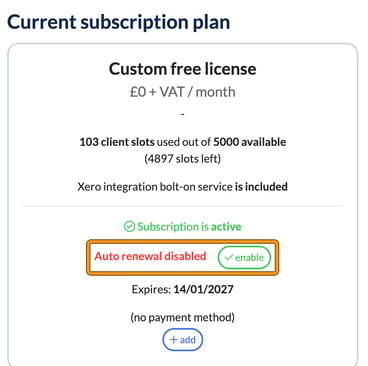
Any issues with this at all, contact us on contact@engager.app.