
Bulk Actions allow you to update multiple clients or services at once, saving time and reducing manual work.
With this feature, you can:
- Assign or reassign staff to multiple phases in one go
- Mark multiple phases as complete with a chosen completion date
When should I use this?
Bulk Actions are especially useful when:
- A team member is leaving or changing roles
- You need to reassign work across multiple clients
- You’ve recently imported clients and need to update workflows
- You regularly complete recurring work (e.g. payroll or bookkeeping)
Reassigning phase responsibilities
- Go to Clients and use the checkbox next to each client to select multiple records. The header checkbox selects them all.
- Select bulk actions in the toolbar above the client list, then select Edit client or service data. This opens Bulk editing.

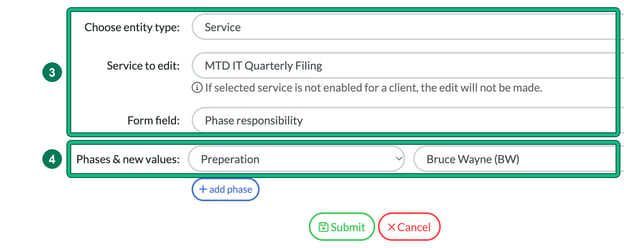
- Set Choose entity type: to Service, choose the relevant service in Service to edit:, and set Form field: to Phase responsibility. If the selected service isn't enabled for a client, the edit won't be made for that client.
- Under Phases & new values:, choose the phase and the new team member. You can update multiple phases at once: select + add phase for each extra phase.
- Select Submit. The new responsibilities will be saved, and the assigned team member will receive a notification.
Marking multiple phases as complete
- From the Clients screen, select the relevant clients. Tip: use filters (e.g. Enabled Clients > Payroll) to quickly select large groups.
- Select bulk actions, then Edit client or service data.
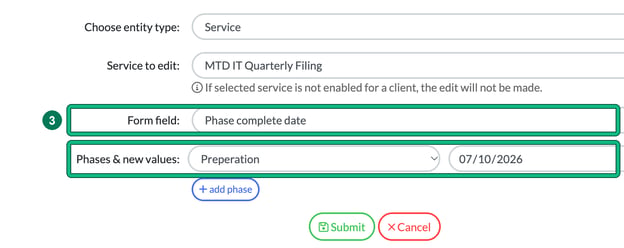
- Set Choose entity type: to Service, choose the service in Service to edit:, and set Form field: to Phase complete date. Under Phases & new values:, choose the phase and enter the completion date.
- Select Submit to apply changes.
Summary
Bulk Actions help you:
- Save time on repetitive updates
- Reduce errors from manual changes
- Manage team changes more efficiently