
You've probably noticed that you can do quite a few things within Engager, and that we've provided you with Services / Jobs / Checklists etc to help you hit the ground running.
We've included a Bookkeeping Service in your account also (Bookkeeping - Process Bank Transactions), but we would recommend taking a moment to customise it to your firm's standards and workflows.
We would also consider having separate services for 'weekly' and 'monthly' bookkeeping to help you stay on top of delivering these services to your client.
As there's not a statutory deadline for Bookkeeping like there is with Year End Accounts, Self Assessment or VAT, you need to tell the system: you will need to add this into Engager.
Set the period end and internal deadline on the service
You can do this in the settings of the job.
- Go to Settings > Jobs > Services.
- Find your bookkeeping service and select the pencil in the Actions column to open Edit service.
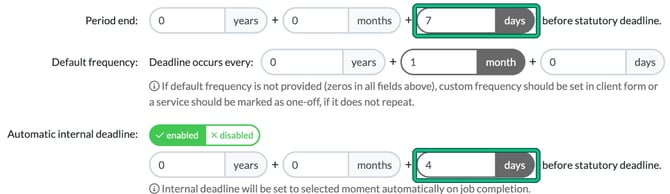
- So that we can get the Period End dates appearing on our Job Cards and filters, we need to input a Period end: in days before statutory deadline. Please note that this comes into play when you set the dates and deadlines when you activate the service on the client's record.
- Set Default frequency: so the Deadline occurs every: 1 month. This will repeat each month.
- Set Automatic internal deadline: to enabled and enter how many days before statutory deadline. the work should be done.
- Save the service.
Using the example below, we have monthly bookkeeping. It will repeat each month and we'll aim to get it completed by our INTERNAL DEADLINE, which is 4 days before the actual deadline. Again, this is what you're about to set at the client level.
Apply the service to a client
Now we've set our Bookkeeping monthly service, let's apply it to a new client.
- In step 5, Services & pricing, ENABLE bookkeeping by selecting the green play button on the service.
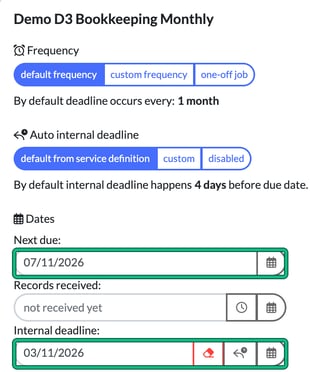
- Then in step 6, Service details, this is where we're going to tell the system when the monthly service needs to be completed by, by using a hard deadline and an internal deadline. Our client wants an entire month of bookkeeping completed no later than the 7th of the following month, so enter the 07th in Next due:.
- We strive to get this done ahead of time, so we'll use our new Internal Deadline of 4 days before the Hard Deadline. Select the set from auto internal deadline rule button next to Internal deadline: to fill it in. Until you do, it shows "not specified".
- Save the client.
Now when we save, the job card will look as follows:
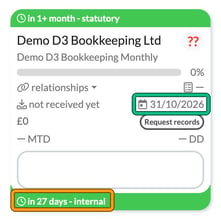
As you can see, because we set our PERIOD END to be 7 days before the Hard Deadline, it lands perfectly on the last day of the month: 31/10/2026 for a 07/11/2026 deadline, or 28th February for a 7th March deadline.