
AML in Engager brings your anti-money laundering (AML) work into one place. You can keep firm-wide guidance and templates, complete risk assessments for each client, run identity checks and see who owns and runs a company client.
Engager helps your firm meet its anti-money laundering obligations and keep a record of what you did. Your firm remains responsible for its own AML decisions. For advice on what your firm must do, speak to your supervisory body or read the guidance documents in the firm-wide AML area.
The firm-wide AML area
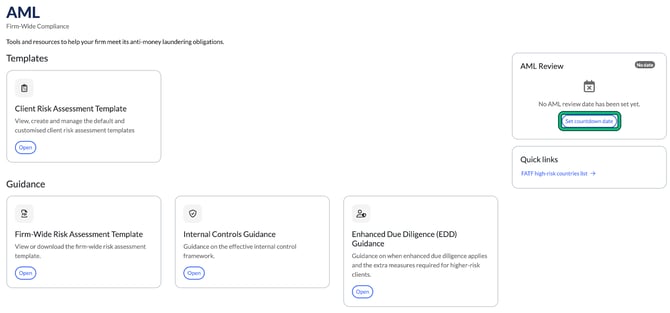
Select AML in the top menu. This is your firm's Firm-Wide Compliance area. It holds:
- Templates: your Client Risk Assessment Templates.
- Guidance: the Firm-Wide Risk Assessment Template, Internal Controls Guidance and Enhanced Due Diligence (EDD) Guidance.
- AML Training: Staff and Agents Training Guidance.
- AML Review: a countdown to your firm's next AML review.
- Quick links: the FATF high-risk countries list.
See How to use the firm-wide AML area.
The AML tab on each client
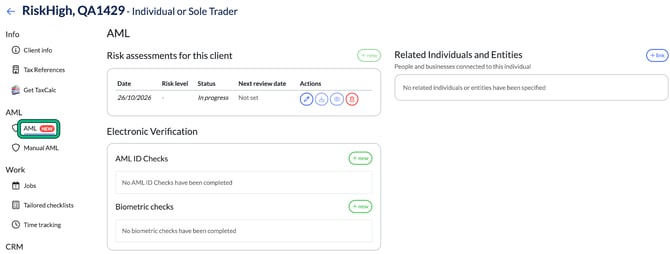
Open a client, then select AML in the left-hand menu. You'll see:
- Risk assessments for this client: each assessment with its date, risk level, status and next review date.
- Electronic Verification: AML ID Checks and Biometric checks.
- Related Individuals and Entities: the people and businesses connected to the client.
- For company clients, Companies House Information and an ownership chart.
Manual AML stays in the left-hand menu as before.
Where to start
- Check your risk assessment templates: How to set up client risk assessment templates.
- Complete a risk assessment for a client: How to complete a client risk assessment.
- Approve it and set the next review date: How to approve a risk assessment and set the next review date.
- Verify your client's identity: How to run an AML ID check on an individual or How to send a biometric ID check to a client.